
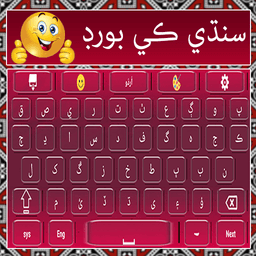
Screenshots
About Sindhi Keyboard with Urdu and English Typing
Sindhi Keyboard with Urdu and English Typing is a multilingual keyboard app that lets you write Sindhi fluently alongside Urdu and English in any app—messages, emails, documents, and social media—with one seamless tool.
Switch between languages instantly with a single click. Whether you're composing a text message or crafting a longer document, this keyboard eliminates the friction of toggling between Sindhi, Urdu, and English. The intelligent word prediction engine learns your typing patterns and suggests words as you type, making every keystroke faster and more accurate. You'll notice how natural typing in Sindhi becomes when the keyboard anticipates what you want to say next.
Customize your typing experience to match your personality. Choose from multiple built-in themes and backgrounds to make your keyboard visually distinctive every time you open it. Express yourself fully with an extensive emoji library designed to convey emotions and moods during conversations. The latest update brings fresh emoji designs and modern themes that keep your keyboard feeling current and engaging.
The app includes a comprehensive Sindhi-Urdu-English dictionary integrated directly into your keyboard, so you can reference word meanings without leaving your typing session. For those interested in Sindhi language learning, the keyboard serves as a practical tool that reinforces vocabulary and writing conventions through daily use. Text-to-speech functionality lets you hear words pronounced correctly, supporting both learning and accessibility.
Beyond basic typing, Sindhi Keyboard with Urdu and English Typing offers bonus features like Urdu poetry collections organized by category—perfect for sharing status updates on social media—and a simple translator that handles voice translation across multiple languages. These additions make the app genuinely useful beyond its core keyboard function.
Setup is straightforward: install, enable the keyboard in your device settings, select Sindhi Urdu as your input method, and start typing. Customize key settings like sound, vibration, and text size to suit your preferences. Works offline, so you can type anywhere without needing an internet connection.
Your privacy is protected—the app never records keystrokes, saves personal data, or accesses photos, videos, contacts, camera, or microphone. It's completely free with no hidden costs or premium subscriptions. Download Sindhi Keyboard with Urdu and English Typing today and discover how effortless multilingual communication becomes.
Pros & Cons
Pros
- Switch between Sindhi, Urdu, and English with a single click
- Integrated dictionary lets you check word meanings without leaving the keyboard
- Text-to-speech feature supports language learning and accessibility
- Works completely offline, so you can type anywhere without internet
- No keystroke logging or data collection—privacy protected by default
Cons
- Word prediction engine may take time to learn your typing patterns accurately
- Bonus features like poetry collections and translator add complexity to a keyboard app
- Limited to Android platform only—no iOS or desktop version available
- Niche language support means smaller community for feedback and troubleshooting
Related Apps

HWiNFO
Hardware monitoring for Windows—track CPU temp, GPU load, fan speed, voltage in real time.

TransMac
Read Mac drives and DMG files on Windows. Access APFS/HFS+ storage and create disk images.

Advanced SystemCare Free
System optimization tool: clean, repair, and secure your PC. Remove malware, fix errors, and boost performance.

Display Driver Uninstaller (DDU)
Driver uninstaller for GPU and audio — removes residual files for clean Windows updates

Glary Utilities
PC maintenance and optimization suite — clean, repair, and speed up your Windows computer in one action.

Universal ADB Drivers
ADB drivers for Android: Connect any smartphone to Windows PC without manufacturer software.
Latest Articles

Best Lola alternatives in 2026 (we tested 7)
Jul 12, 2026
Best Primark alternatives in 2026 for affordable UK fashion (7 picks)
Jul 12, 2026

Best RingGo alternatives in 2026 (we tested 7)
Jul 12, 2026

7 best Anki alternatives for desktop in 2026 (we tested every one)
Jul 11, 2026

7 best AppFlowy alternatives for desktop in 2026 (self-hosted included)
Jul 11, 2026